DeskOps: OS · The operating system for service businesses

    Run your business. Understand it better.

    • Run every job from first request to paid invoice
    • Schedule visits, assign work and record time and materials
    • Ask DeskOps about your records, or have it prepare a quote

    14 days free. Cancel anytime.

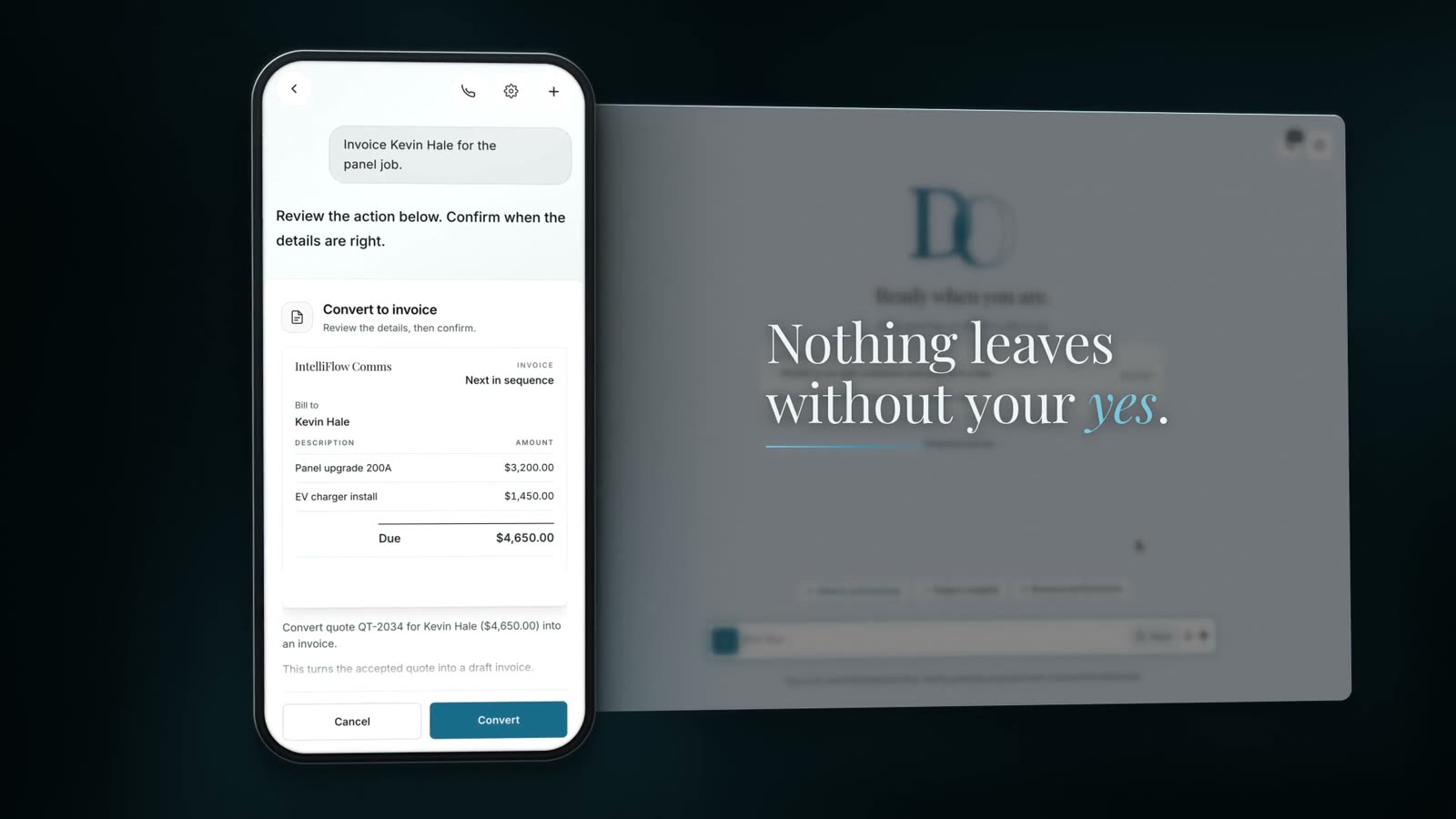
    The DeskOps film: Des, the assistant, asks the owner to confirm turning an accepted quote into an invoice.

    Testimonials

    Feedback from service business owners.

    • Best tool since the tape measure.

      DonnieDonnie on the Spot · HandymanPilot customer
    • It makes sense of everything I was already tracking but couldn't see clearly.

      Erika TurpinMuddy Mutts · Dog GroomingPilot customer
    • I always had the work. What I didn't have was a clear picture of whether it was paying off. DeskOps gave me that.

      Kristi HesterL&K CleaningPilot customer
    1 / 3

    The bigger picture

    Your bank balance is only part of the story.

    A full schedule and money coming in doesn’t always show what your work is costing you. Bring the details of your work and money together for a clearer picture.

    Illustrative example

    Bank balance
    $24,800
    Outstanding invoices
    $6,200
    Job costs recorded
    $8,400

    Each number tells part of the story.

    An operating system, not another dashboard

    Your business doesn't sync to DeskOps. It runs in it.

    DeskOps is where a service business runs: customers, requests, quotes, jobs, scheduling, invoices, payments, expenses and planning, and you can ask DeskOps about any of it.

    Customers & work

    Customers & requests

    Customer history, service locations, incoming requests and an online booking link.

    Quotes & changes

    Quotes with options and deposits, customer approval, and change orders.

    Jobs & calendar

    Plan visits, assign work, and give technicians their assigned jobs.

    Money

    Invoices & payments

    Invoices, online payment links, deposits, balances and recurring contracts.

    Expenses & profit

    Expenses and receipts, job costs, and job and business profit.

    Cash forecast & taxes

    A twelve-month cash forecast and organized tax planning for you and your tax professional.

    Team & pay

    Roles and access, time and commission records, and a payroll export.

    Ask DeskOps

    Ask about your records, or have DeskOps prepare a quote, with confirmation before it acts.

    DeskOps runs the work. Connections feed it: Stripe for online payments, a supported bank through Plaid, and one-time imports of your QuickBooks or Xero history.

    DeskOps: OS

    One brain. Every answer.

    Every answer comes from the work you run in DeskOps: your jobs, your numbers, your taxes, your trade.

    DeskOps mark
    • “What did we charge and spend on jobs like this one?”

      See how

      Shows the quotes, invoices and recorded costs of earlier jobs before you price the next one. Costs that were never recorded show as unknown.

    • “Which jobs are making me money, and which ones are costing me more than expected?”

      See how

      Compares recorded job revenue and costs, identifies overruns, and flags missing expenses that could change the result.

    • “We're busier than ever, so why isn't there more money in the bank?”

      See how

      Connects revenue, expenses, outstanding payments, and available cash records to help explain the difference.

    • “Who still owes me money, and what haven't I collected?”

      See how

      Identifies outstanding invoices, remaining balances, and payments that need attention.

    • “How much money should I be setting aside for taxes right now?”

      See how

      Uses available financial records and tax assumptions to estimate obligations and help the owner plan ahead.

    • “What did we do for this customer last time, and what did we charge?”

      See how

      Retrieves customer history, previous work, quotes, invoices, and relevant records without reconstructing everything manually.

    Start your free trial

    14 days free. Cancel anytime.

    Ask DeskOps

    Ask DeskOps anything. It answers from your records.

    Ask about invoices, jobs, expenses or the week ahead. DeskOps answers from your records and shows you customer-facing messages before they’re sent.

    Ask Des

    What needs my attention this week?
    Two invoices from last month are still unpaid. The larger one is the Ruiz job, now 34 days past due.The Patel quote from Tuesday is still waiting on approval. I can send Ruiz a reminder in your words once you confirm it.
    Open the unpaid invoicesSend a reminder

    DeskOps: OS · By trade

    It works the way your trade quotes and bills.

    Quotes with material options and deposits, a saved rate such as a per-foot fence price, photos that help set the scope, and repeat visits for regular service. You check the numbers before a customer sees them.

    Explore all trades

    Actions

    DeskOps doesn't just answer. It acts, with your say.

    Reversible, with undo

    Some supported actions you can take back run with an undo option.

    Confirm, then act

    Other actions wait for your yes. DeskOps shows you the quote or message before anything goes to a customer.

    You see the result

    A request can need more information, or fail. DeskOps tells you what happened so you can check the record.

    Voice mode

    Talk it through with Des.

    Go hands-free and ask about your jobs, invoices, or how business is going. Des answers using your records.

    You

    “How did we do on the Miller job?”

    Des is speaking

    “On the costs recorded so far, the Miller job came in under its quoted margin. Open the job to check nothing is missing.”

    The difference

    Monday morning, before and after.

    From scattered updates to a clearer view of the work and the week ahead.

    Before

    Reacting to a dozen pings.

    • Switching between apps
    • Chasing updates
    • Trying to keep track

    Payment received

    Payments app

    New message

    Customer text

    Ad alert

    Campaign budget

    Missed call

    Unknown number

    Bank alert

    Low balance

    New review

    Reviews app

    After

    Running the week with clarity.

    • One organized view
    • Work that needs attention
    • A view of the week ahead

    DeskOps: OS

    Your week, in one place.

    Money in

    Two invoices paid, one balance still open

    Needs you

    A new request and a quote awaiting approval

    This week

    Six visits scheduled, two not yet assigned

    Tax position · Estimated from your records

    April 15 is just another Monday.

    How much should I set aside?

    Your estimated tax position and quarterly planning, based on your records and tax profile.


    What’s organized for tax time?

    Mileage, depreciation support, contractor and 1099 summaries, and recorded tax payments.


    What can I share at tax time?

    Reports and exports you can review with your tax professional.

    How much should I set aside?

    Your estimated tax position and quarterly planning, based on your records and tax profile.

    What’s organized for tax time?

    Mileage, depreciation support, contractor and 1099 summaries, and recorded tax payments.

    What can I share at tax time?

    Reports and exports you can review with your tax professional.

    Estimated tax owed

    Estimate

    $31,840

    Based on your records and tax profile


    Next quarterly dateJune 15
    Tax payments recorded2 this year
    AssumptionsShown

    Illustrative example

    DeskOps: OS · Operator wealth

    The business isn't your job. It's your asset.

    See your business and personal financial position in one place.

    Estimated owner position

    $500,000

    Illustrative example


    A combined view of business cash, personal cash and investments, minus personal debt.

    Cash runway6 months

    Example: $30,000 business cash ÷ $5,000 monthly burn.

    Your operating record and financial position, in one place.

    Record

    The work and money that matter.

    Understand

    See where you stand today.

    Plan

    Use your records to plan ahead.

    Documents

    Documents built from your own business details.

    Create branded documents with the information you provide. Review the details and save templates for next time.

    IFIntelliFlowCOMMUNICATIONS
    Ready for your review

    Business document

    Prepared for
    IntelliFlow Communications
    Prepared by
    DeskOps

    Overview

    A document prepared with your business information and the details you provide.

    Key details

    • Business information and context
    • Details you provide
    • Ready for your review

    Your business, at a glance

    Start the week knowing what needs you.

    See what needs your attention and pick up where your business left off.

    DeskOpsIntelliFlow Communications

    What needs you

    3Jobs scheduled today
    10Invoices past due$5,931 past due
    0Jobs without a date
    5Quotes awaiting approval

    DeskOps product example · demo data

    Your edge begins here

    Ready to hear what your business is telling you?

    The operating system your service business runs on. Ask DeskOps anything. Built for operators.